PollPress WordPress Plugin

andy on Sep 11th 2006

Download: PollPress 1.0
Subversion: PollPress 1.0

Regretfully, PollPress is no longer a supported plugin.

Purpose

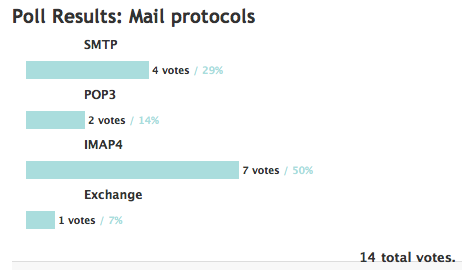
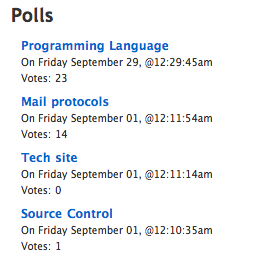
PollPress is a plugin that allows you to add polls, similar to sites like slashdot, to your blog. Poll creation and management is very similar to creating and managing normal posts. The plugin allows users to vote on the most recent poll from the sidebar, and the poll results are displayed in a post, where users can comment. The plugin also adds an archive page for the polls, where users can browse and vote on older polls.

Requirements

PollPress 1.0 requires WordPress 2.0.4 or higher, and MySQL 4.1 or higher.

Installation

  1. Download the PollPress plugin.
  2. Extract the plugin from the zip file. You should get a folder named PollPress. In it you will find a file called readme.txt and the actual plugin folder called pollpress.
  3. Upload the inner pollpress folder to your plugins folder, which is usually called ‘wp-content/plugins/’.
  4. From the Plugins administration panel, activate the PollPress plugin.
  5. To install the voting booth on the sidebar, you need to add some code, <?php pollpress_voting_booth(); ?>, as described next.
  6. In the administration panel, click the ‘Presentation’ tab, then the ‘Theme Editor’ tab.
  7. In the theme files list on the right, click on ‘Sidebar’.
  8. In the code, find the desired location in the sidebar to add the voting booth. At this location, insert the code <?php pollpress_voting_booth(); ?>. If the sidebar is like most, you will need to put it inside list item tags, like this: <li><?php pollpress_voting_booth(); ?></li>
  9. Press the ‘Update File’ button.

Use

Writing and managing polls work almost identically to writing and managing posts. PollPress installs administration panels under Write > Write Poll, Manage > Polls, and Options > PollPress. The sidebar of the site will always show the voting booth for the most recently published poll. PollPress will also automatically install a static page called ‘Polls’ that lists all the polls that have ever been published. Users can use the Polls archive page to find old polls and vote on them or view their results.

Writing a poll is simple. Navigate to the Write > Write Poll panel. Enter a title and, optionally, your first poll option. Press ‘Save and Continue Editing’ or ‘Add’ to save the title and option and continue editing. All the extra settings such as Author, Timestamp, Category, etc work identically to a post. When you are ready to publish your poll, press ‘Publish.’

Managing your polls is the same as managing your posts. The only difference is that instead of going to Manage > Posts, you go to Manage > Polls. You can view, edit, and delete polls from this panel, in addition to managing comments posted to the poll results.

The options for PollPress are minimal, and are found in the Options > PollPress panel. The options allow you to change the color of the bar graph on the poll results page. The options page also provides a button to delete all the polls. Because PollPress uses a filter to generate the poll results, if you deactivate PollPress all your polls will begin appearing as regular posts, but with no content. So if you wish to uninstall PollPress, press the ‘Delete all polls’ button first, then deactivate the plugin.

Screenshots

Click on a thumbnail to see the screenshot at full size.

PollPress voting booth Voting booth Poll results Poll results
Polls archive pageArchives page Writing a pollWrite a poll

Support

PollPress is no longer supported. I will not be fixing bugs or adding any features. The code is open source and can be improved by others.

Filed in PollPress, WordPress | 155 responses so far

155 Responses to “PollPress WordPress Plugin”

  1. WordPress New Plugins & Themes » Blog Archive » PollPress 1.0 Sep 11th 2006 at 12:46 pm 1

    [...] [Download] [Plugin Page] [...]

  2. Ben Partch Sep 11th 2006 at 02:10 pm 2

    I get this error when I click on Write > Write Poll.

    Fatal error: Call to undefined function wp_nonce_field() in /var/www/vhosts/myblog.com/httpdocs/wp-content/plugins/pollpress/pollpress_view_write.php on line 113

  3. Andy Sep 11th 2006 at 02:19 pm 3

    Hi Ben:

    I’m sorry its not working for you. Let’s see if we can find out why. What version of WordPress are you using?

    The function it cannot find, wp_nonce_field(), is defined in wp-includes/functions.php which should be included by default. Can you do a quick search of functions.php and see if wp_nonce_field() is there?

    Thanks.

  4. Ben Partch Sep 11th 2006 at 03:18 pm 4

    Did not locate it with a “find”

    I am using 2.0 on the blog I tested it on. I am guessing this is the issue. I know I need to upgrade but I am lazy. ;)

    Thanks for the assistance.

  5. Andy Sep 11th 2006 at 03:34 pm 5

    Ouch. I’m sorry to hear it doesn’t work on 2.0.0. I was under the (mistaken) impression there wouldn’t be a huge difference between 2.0.0 and 2.0.4. I updated the requirements section to say 2.0.4 or greater, although it might work on slightly earlier versions.

    Does anyone know how to get ahold of the old 2.0.0 Wordpress version to test against?

    Thanks.

  6. Ben Partch Sep 11th 2006 at 03:52 pm 6

    Hello

    I looked around, and the closest I found was 2.0.1, if that is of any help I will be glad to upload it for you.

    Thanks for the plug in, after I update I will give it another try.

    Have a good one!

  7. Andy Sep 11th 2006 at 04:08 pm 7

    To answer my own question, 2.0.0 can be downloaded at:

    http://codex.wordpress.org/Version_2.0

    I will work on getting PollPress compatible with 2.0.

  8. degra Sep 11th 2006 at 04:12 pm 8

    Hi! It seem to be a good work, but I can’t get the poll’s list in the “Polls” page: it’s blank.
    Is a problem about the plugin, or I have to customize the page before the polls can show?
    Thanks!

  9. Andy Sep 11th 2006 at 04:35 pm 9

    Hi degra,

    The \’Polls\’ page is dynamic and should populate as you publish polls. Let me ask a few questions:

    What version of WordPress are you using?

    How many polls have you published?

    What user level is the user publishing the poll (admin, editor, author, contributer)?

    Attempt to edit the \’Polls\’ static page like you would any other page. Just make sure to use the plain text editor, not the rich text editor. There should be one tag in there: . Let me know if its there or not.

    Thanks!

  10. degra Sep 11th 2006 at 04:51 pm 10

    I use WP 2.0.4, I have published 2 polls for trying the plugin, the only user it’s me as Admin.
    Editing the Polls page I see the tag “”

  11. degra Sep 11th 2006 at 04:53 pm 11

    d’oh, it doesn’t show…
    is bracket “poll -list /” bracket :D

  12. Andy Sep 11th 2006 at 05:11 pm 12

    degra:

    heh, looks like I made the same mistake in my comment. The <poll-list /> tag is supposed to be in there. If it’s there, but polls aren’t showing up, that means the filter is failing (the filter in pollpress_filter_page_polls.php).

    Try this: visit the ‘Polls’ page as if you were a visitor. Do a View Source on the page and look for a <p class=”pollpress-poll-navigation”> tag. If you see it there, then the filter is being run, but not finding any published polls (and the next step is trying to figure out why it can’t find any polls).

    If you don’t see the <p class=”pollpress-poll-navigation”> tag, then the filter isn’t being run, and we need to figure out why that’s the case.

    Thanks.

  13. degra Sep 11th 2006 at 05:22 pm 13

    Done: I can’t find this tag in the page source.
    A thing: you write the tag “poll-list/”, in your comment, without space between poll and the -, but in the editor I see a space…

  14. Andy Sep 11th 2006 at 05:48 pm 14

    Hey Degra,

    There shouldn’t be a space between poll and the -. If there is my filter won’t catch it. Try to manually fix the ‘Polls’ page to just have the tag <poll-list />, without the extra space.

    Thanks.

  15. degra Sep 11th 2006 at 06:08 pm 15

    I’m not able to edit the page: when I save it, the space comes up again. I’ve checked the page pollpress_page_controller_polls.php, and the tag appears without the extra space. There’s a way to automatically regenerate the page?

    thanks

  16. Andy Sep 11th 2006 at 06:34 pm 16

    Degra:

    It sounds like another filter might be changing the content on the page. Do you have any other plugins installed?

    You can regenerate the page by deactivating PollPress on the Plugins admin panel, then re-activating it. However, the page only ever gets created when activating PollPress. PollPress never modifies it, which is why I think another plugin might be mucking with it.

    Thanks.

  17. degra Sep 11th 2006 at 06:35 pm 17

    Well, I have deleted and recreated the Polls page, with the right tag, but the editor save it always in the wrong way… I even tried to deactivate some plugins, but no changes…

  18. Andy Sep 11th 2006 at 07:27 pm 18

    Degra:

    It definitely sounds like another filter is getting in the way. If you can’t deactivate all plugins, then reactivate PollPress, then you can try to up the priority of the PollPress filters.

    In the file pollpress_filter.php, on line 35, it currently has:

    add_filter($filter_name, array(&$this, ‘process’));

    change that to:

    add_filter($filter_name, array(&$this, ‘process’), 1);

    That should make PollPress filters run before the other filters, and will hopefully solve the problem.

    Hope this helps.

  19. Darren Turpin Sep 12th 2006 at 02:31 am 19

    Hi Andy -

    Great plugin, found it very easy to install and adapt the styling but I’ve got a couple of quick questions:

    1) I’m using the ‘Customisable Post Listings’ plugin to generate a list of recent items on the homepage of the site I’m using Pollpress on, and it’s including the results page(s) of the poll(s) I’ve set up in that list as well. If I decided I didn’t want to do that, is there an easy way of preventing it?

    2) I also thought it might be useful to display the pollpress voting booth for a particular poll at the top of the results page, so rewaders can vote there and then if they want to, rather than having to go hunting through the sidebar to find the polls panel. Again, is there an easy way to do this as well?

    Thanks in advance for any advice you can offer… :)

  20. Darren Turpin Sep 12th 2006 at 03:16 am 20

    P.S. Quick tip: if you’re using the WP-Cache plugin to speed delivery of your pages, you’ll need to add something like ‘/poll-results-’ (depending on your permalink schema) to the cache exclusion rejected URI list…

  21. Andy Sep 12th 2006 at 02:54 pm 21

    Hi Darren,

    1) Yes, there is a way to do this, but it does require modifying the source to ‘Customisable Post Plugin’ since it doesn’t supply a way to hook in filters. At the top of customizable-post-listings.php add the line:

    require_once(’pollpress/pollpress_table_poll.php’);

    Then in the c2c_get_recent_posts() function, at about line 89, you’ll see the code:

    if (’modified’ == $orderby) $sql .= “AND $tableposts.post_modified_gmt < = '$now' ";

    AFTER that line add this code:

    $pollpress_table = new pollpress_table_poll();
    $sql .= ' AND ' . $pollpress_table->get_exclude_polls_sql();

    and that should do it for you (at least it works in my sandbox). If it doesn’t, let me know.

    2) This is a good feature suggestion, and something I thought about myself. My first thought was to actually jut add a link back to the voting booth, but you could add the voting booth right to the results page too.

    In the pollpress_filter_the_content.php file, look in the generate_report() function, around line 82, where it has:

    $report .= ‘</div>’;

    After that line, simply add this line:

    $report .= get_pollpress_voting_booth($poll_id, false);

    That will output the voting booth at the end of the poll results. You can move the line around in the generate_report() function to move it around in the HTML.

    Hope this helps.

  22. degra Sep 12th 2006 at 02:55 pm 22

    Hi Andy,
    I’ tried as you said: I’ve deactivated every plugin, then modified the flter file, then reactivated the plugins.
    The problem is still there: no tag <p class=”pollpress-poll-navigation”> in the source and stil the space in the page tag.
    I’ve tried to open the page with only pollpress plugin active, but due to my template is impossible…

  23. Andy Sep 12th 2006 at 04:19 pm 23

    Hi Degra,

    We’ll get to the bottom of this. There’s more than one way to skin a cat. Since something keeps changing <poll-list />, let’s trying making it something else that it won’t change. Since it’s adding a space around the ‘-’, I’ll assume that’s the problem. So let’s change <poll-list /> to <polllist /> and see if that helps any.

    Be sure to deactivate PollPress before making these modifications. After you’re done, reactivate it.

    In the file pollpress_page_controller_polls.php, on line 36, you have the line:

    $this->pollpress_page_controller(__(’Polls’), ‘<poll-list />’);

    This is the code that actually creates the page ‘Polls’ and adds the <poll-list /> tag to it. Change that line to:

    $this->pollpress_page_controller(__(’Polls’), ‘<polllist />’);

    Notice I just took out the ‘-’. In the file pollpress_filter_page_polls.php, in the process function, around line 136, you have this:

    $regex = ‘/<[p|P][o|O][l|L][l|L]-[l|L][i|I][s|S][t|T]\s+\/>/’;

    This is the regular expression that finds our custom <poll-list /> tag. Change it to:

    $regex = ‘/<[p|P][o|O][l|L][l|L][l|L][i|I][s|S][t|T]\s+\/>/’;

    Note that I just took out the ‘-’ in the middle.

    That’s it. Hopefully this means whatever code is changing the tag won’t notice it anymore.

    Hope this helps.

  24. degra Sep 12th 2006 at 06:55 pm 24

    Yeah, it really works now!

    Thank you very much for your help! And excuse me for posting so much comments… ;)

  25. Darren Turpin Sep 13th 2006 at 02:25 am 25

    Hi Andy -

    Both methods worked perfectly, first time. Many thanks indeed! I’ll drop you the URL when the site goes live, in case you’re desperate to see the page in action… ;)

    Thanks again!

  26. PollPress · WordPress插件中文站 Sep 13th 2006 at 02:49 am 26

    [...] 插件页面: 点击进入 [...]

  27. Tom Wright Sep 13th 2006 at 12:47 pm 27

    Hi there, just to let you know; I’ve made a widget for displaying the polling booth.
    See it in action on a site of mine: http://tra.whaletattoo.com
    Will email it to anyone who’s interested.

  28. WordPress爱好者博客 » PollPress Sep 13th 2006 at 10:43 pm 28

    [...] 插件页面: 点击进入 [...]

  29. Tom Wright Sep 14th 2006 at 12:23 pm 29

    Actually I’m having a bit of trouble.
    The voting booth php function returns a working booth except for one detail: The Polls link doesn’t link to my polls page, it links to a completely unrelated article.
    Any idea why this might be?

  30. Andy Sep 14th 2006 at 12:47 pm 30

    Hi Tom,

    I’m not sure off the top of my head why it doesn’t link to the Polls page, but I’ll see if I can figure it out. I have a few questions:

    What’s your permalink format? Do you use the post name in your permalinks or just the article id? e.g. /blog/polls/ vs /blog/?id=34.

    Based on the previous answer, what is the permalink for the Polls page vs what you actually get in the voting booth? (You can give the relative path if you don’t want to publish the server name.)

    As a possible quick fix, you might try to deactivate PollPress then reactivate it. That will cause PollPress to remove the Polls page (and internal option which stores which article it is) then recreate it.

    Hope this helps.

  31. WP Plugin DB JAPAN » PollPress Sep 15th 2006 at 02:14 am 31

  32. Charles Sep 18th 2006 at 04:17 pm 32

    Is there a way of having “per post polls” using this plugin?

  33. Andy Sep 18th 2006 at 04:44 pm 33

    Hi Charles,

    I assume you’re talking about something like what CNN does?

    Unfortunately, PollPress doesn’t do that by default, although with a little work, it can do something *similar* it.

    1. When installing PollPress, don’t follow steps 5 – 9.
    2. Create your poll as normal, and post/save it. Note the ID of the poll (The number in the ID column of the Manage > Polls).
    3. In the Post you want to add the poll to, add the code <poll id=”{id}” />, where {id} is the number from the ID column.

    Note that this adds the voting both to the article itself, not the sidebar. PollPress would have to be rearchitected to make it possible to add it to the sidebar.

    Hope this helps.

  34. Charles Sep 19th 2006 at 11:56 pm 34

    Hi Andy,

    Great, I’ll give that a try, thanks for the hint ;)

    PS: Why “” and not ““? Just asking, because if some day in the future I decide to “unplug” PollPress, I’ll have some weird code hanging around old posts, won’t I?

  35. Andy Sep 20th 2006 at 12:56 pm 35

    Hey Charles,

    You’re correct about having weird code hanging around in old posts if you unplug PollPress. That’s because when I designed PollPress I didn’t intend for polls to be post-specific. If I had, I would have either put the special tags in comments like you suggested, or come up with a different mechanism for injecting a voting booth where I wanted it.

    But that’s something I can tackle for the next version. :-)

    Thanks.

  36. Marvix Sep 20th 2006 at 07:51 pm 36

    I get this error !!

    WordPress database error: [Table 'mysite.wp_pollpress_polls' doesn't exist]
    SELECT wp_pollpress_polls.id AS poll_id, wp_pollpress_polls.title AS poll_title, wp_pollpress_polls.post_id AS poll_post_id FROM wp_pollpress_polls, wp_posts WHERE wp_pollpress_polls.post_id = wp_posts.ID AND wp_posts.post_status = ‘publish’ AND wp_posts.post_date

  37. Tom Wright Sep 21st 2006 at 05:50 am 37

    Hi andy,
    Tried de- and re-activating it, just ended up with two polls pages.
    The permalink for the polls page is /polls/.
    The permalink structure is a little unusual: /archives/%author%/%year%/%postname%/
    As far as I’m aware theres nothing wrong with your php, I think its just my setup.

  38. Andy Sep 21st 2006 at 10:29 am 38

    Hi Marvix:

    For some reason, when PollPress was activated it couldn’t create its tables. Did you get any errors when you activated PollPress?

    Also what version of WordPress are you running?

    Thanks.

  39. Andy Sep 21st 2006 at 10:38 am 39

    Hi Tom,

    That is truly bizarre. When PollPress creates the Polls page, it saves off its ID in the options. That were it gets the link for the ‘Polls’ page and know which page to delete on deactivation. How PollPress somehow gets the wrong page ID is quite baffling.

    The only thing I know left to do is to try to recreate your setup here. What theme and plugins do you have installed? If you can provide URL’s for the download, all the better.

    Thanks.

  40. Carlos Sep 25th 2006 at 03:31 am 40

    Hi, there. I like the plugin functions, but when placing the pall on the sidebar it is overwidth compared with my bar. Is there any place where I can specify the width I want for the poll? Thanks.

  41. Andy Sep 26th 2006 at 07:20 pm 41

    Hi Carlos:

    The voting booth doesn’t actually specify a width anywhere. It should simply wrap and conform to the space it is placed in.

    However, you can modify the CSS to attempt get the voting both fit. The CSS file pollpress.css is automatically included. The containing DIV has the class pollpress-voting-booth and the UL that contains the options has the pollpress-options class.

    Hope this helps.

  42. Guava Oct 7th 2006 at 07:43 am 42

    I can’t get this to work. SQL-error after installation. Breaking the whole blog.
    [..]right syntax to use near ‘SELECT wp_pollpress_polls.post_id FROM wp_pollpress_polls)’ at ]
    SELECT COUNT(DISTINCT ID) FROM wp_posts WHERE 1=1 AND post_date_gmt

  43. Guava Oct 7th 2006 at 07:45 am 43

    Sorry, didn’t get the whole error mess…

    near ‘SELECT wp_pollpress_polls.post_id FROM wp_pollpress_polls)’ at ]
    SELECT COUNT(DISTINCT ID) FROM wp_posts WHERE 1=1 AND post_date_gmt

  44. Ger Oct 7th 2006 at 12:44 pm 44

    Hello,
    I’ve just installed your poll but wordpress is comping up with a databese faillure

    WordPress database error: [Table 'snertbase_.wp_pollpress_polls' doesn't exist]
    SELECT COUNT(DISTINCT ID) FROM wp_posts WHERE 1=1 AND (post_status = “publish” OR post_author = 1 AND post_status != ‘draft’ AND post_status != ’static’) AND post_status != “attachment” AND ID NOT IN (SELECT wp_pollpress_polls.post_id FROM wp_pollpress_polls)

    Any idea?
    Regards

  45. Andy Oct 7th 2006 at 04:56 pm 45

    Hi Guava,

    It sounds like you might be using an older version of MySQL. PollPress requires 4.1 or higher in order to use subselect’s. What version of MySQL are you using?

    -andy

  46. Andy Oct 7th 2006 at 05:01 pm 46

    Hi Ger,

    Obviously PollPress wasn’t able to create its tables when it was activated. Did you get any errors when you activated PollPress?

    Also, what version of WordPress and MySQL are you using?

    Thanks,

    -andy

  47. darrell Oct 15th 2006 at 08:22 am 47

    i just installed and activated pollpress. i get the following message at the top of the manage page:

    Warning: array_search() [function.array-search]: Wrong datatype for second argument in /home/racepop7/public_html/wp-content/plugins/pollpress/pollpress_filter_others_drafts.php on line 42

    help!

  48. Davey Oct 16th 2006 at 06:36 am 48

    Works perfect, but is it possible that viewers can only vote one time?

  49. Andy Oct 16th 2006 at 08:57 pm 49

    Hi Darrell,

    That’s certainly an odd warning to get. First I need to know some basic information about your setup. What version PHP and WordPress are you using?

    Thanks.

  50. Andy Oct 16th 2006 at 09:02 pm 50

    HI Davey,

    It’s unfortunately not possible to insure that a viewer only votes once. The problem is that firewalls and proxies can make an entire group of users look like just one. There’s also the problem of dynamically assigned IP addresses (which just about everyone has), which means its impossible to assume an IP address is the same person.

    The only way to insure each person gets only one vote would be to hook into WordPress’s user system and make everyone log in before they can vote. Then you could make sure each WordPress user only voted once. The downside there is that you’d have to ensure each person only had one WordPress user account.

    It’d be a lot of work to hook PollPress into the WordPress’s user system, so it’s not in the current version. I’ll consider it for next version, but no promises.

    Hope this helps.

  51. RLeGris Oct 17th 2006 at 02:54 pm 51

    after adding a second poll, the poll page stopped showing up anything. It is just a blank page (with theme)
    http://larrybozka.com/bozblog/polls/
    I looked at the page editor and it shows the poll list command when it first loads, then it disapears when the editor loads. I looked in the html of the editor and it doesn’t show up there either.
    so I added it again, but the page still doesn’ show the 2 polls.
    any suggestions?
    I’m using WP 4.0.2

  52. Andy Oct 17th 2006 at 03:19 pm 52

    Hi RLeGris,

    It looks like you’re having the same problem Degra had. Looking at your page, a filter is changing <poll-list /> into <poll -list />. (Note the space.) This breaks PollPress, which inserts and filters on that tag to implement the Polls page.

    The fix is the same as the one I gave Degra on September 12:

    Since it’s adding a space around the ‘-’, I’ll assume that’s the problem. So let’s change <poll-list /> to <polllist /> and see if that helps any.
    Be sure to deactivate PollPress before making these modifications. After you’re done, reactivate it.

    In the file pollpress_page_controller_polls.php, on line 36, you have the line:

    $this->pollpress_page_controller(__(’Polls’), ‘<poll-list />’);

    This is the code that actually creates the page ‘Polls’ and adds the <poll-list /> tag to it. Change that line to:

    $this->pollpress_page_controller(__(’Polls’), ‘<polllist />’);

    Notice I just took out the ‘-’. In the file pollpress_filter_page_polls.php, in the process function, around line 136, you have this:

    $regex = ‘/<[p|P][o|O][l|L][l|L]-[l|L][i|I][s|S][t|T]\s+\/>/’;

    This is the regular expression that finds our custom <poll-list /> tag. Change it to:

    $regex = ‘/<[p|P][o|O][l|L][l|L][l|L][i|I][s|S][t|T]\s+\/>/’;

    Note that I just took out the ‘-’ in the middle.

    That’s it. Hopefully this means whatever code is changing the tag won’t notice it anymore.

    Hope this helps.

  53. lark Oct 18th 2006 at 04:24 pm 53

    most hosters (mine included) still use the more stable MySQL v4.0.18, therefore this plugin doesn’t work. any way to work around this?

  54. Andy Oct 18th 2006 at 05:56 pm 54

    Hi Lark,

    Unfortunately PollPress makes pretty liberal use of subselects, which were not implemented in MySQL until 4.1. At the time I did not realize MySQL did not support subqueries until that recently, otherwise I would have designed PollPress differently. Unfortunately at this point going back and redoing all the queries would be a considerable amount of work, and is probably not going to happen.

    Sorry.

  55. RLeGris Oct 20th 2006 at 10:12 am 55

    Thanks Andy, that worked like a charm!

  56. 无忧博客样板网站 » 一些有用的插件 Oct 23rd 2006 at 12:01 am 56

    [...] 插件页面: 点击进入 [...]

  57. alex Oct 25th 2006 at 03:13 am 57

    Getting the below error when activating PP, is it possible that this has to do with the widget function?

    WordPress database error: [You have an error in your SQL syntax. Check the manual that corresponds to your MySQL server version for the right syntax to use near 'SELECT wp_pollpress_polls.post_id FROM wp_pollpress_polls) GROU]
    SELECT DISTINCT * FROM wp_posts WHERE 1=1 AND post_date_gmt

  58. Andy Oct 25th 2006 at 12:15 pm 58

    Hi Alex,

    Unfortunately, it looks like your host is running an older version of MySQL (something before MySQL 4.1). PollPress requires MySQL 4.1 or greater because of its use of subselects.

    Sorry.

  59. Stefan Julius Oct 29th 2006 at 06:35 pm 59

    Hi Andy,
    sorry but I also get an error during activating pollpress

    WordPress database error: [Table 'de_tips4blogger.wp_pollpress_options' doesn't exist]
    SELECT id AS option_id, poll_id AS poll_id, text AS option_text, votes AS option_votes, option_order AS option_order FROM wp_pollpress_options WHERE poll_id = -1 ORDER BY option_order

    and if it is activated I got this error message

    under configure/poll

    WordPress database error: [Table 'de_tips4blogger.wp_pollpress_options' doesn't exist]
    SELECT id AS option_id, poll_id AS poll_id, text AS option_text, votes AS option_votes, option_order AS option_order FROM wp_pollpress_options WHERE poll_id = 1 ORDER BY option_order

    I have installed

    php 5
    wordpress 2.04
    mysql 5

    So what must I do that this fine plugin will work!

    Thanx a lot Stefan

  60. Stefan Oct 29th 2006 at 06:46 pm 60

    Sorry again,
    have forgotten to paste the last line here is the complete error message during activation poll press.

    WordPress database error: [Can't create table 'wp_pollpress_options' (errno: 28)]
    CREATE TABLE wp_pollpress_options ( id bigint(20) NOT NULL AUTO_INCREMENT, poll_id bigint(20) NOT NULL, text text NOT NULL, votes bigint(20) NOT NULL, option_order int(7) NOT NULL, UNIQUE KEY id (id) )

    Warning: Cannot modify header information – headers already sent by (output started at /var/www/tips4blogger.eu/htdocs/wp-includes/wp-db.php:104) in /var/www/tips4blogger.eu/htdocs/wp-includes/pluggable-functions.php on line 272

  61. Andy Oct 30th 2006 at 12:18 pm 61

    Hi Stefan,

    It sounds like you might being having trouble with MySQ database corruption. I found a wiki page that seems to describe the problem: http://wiki.wordpress.org/?pagename=Error28. It sounds like you might need to contact your host and have them repair your database.

    Hope this helps.

  62. Stefan Julius Oct 30th 2006 at 02:00 pm 62

    Andy thanx a lot have found the error have set the false inode size for my guest so i have had not enough disk space.

    What I have learnt is that I must have a look at other sides before conatcting u and disturbing u.

    Thanx a lot for u engagement and u r help!

    Greetinx Stefan Julius

  63. Jerry Oct 31st 2006 at 04:27 am 63

    Hello,
    Just wondering if anyone could help. I did something stupid and started my blog using a numerical archive system, and now I'd like to change it so that the post title is part of the URL for SEO reasons. Is there any Wordpress plugins that anyone knows of that could switch it without sending Googlers to invalid pages? Maybe some sort of redirector to the correct page?

    Thanks.

  64. Niels Nov 3rd 2006 at 01:21 pm 64

    Hi Andy,

    Nice plugin. Thanks. I wrote the comments quickly and saw Guava’s comment and your reaction on October 7th. My MySQL version is 4.0. I have rewritten the SQL-statements to avoid using the IN statement. Now it works fine using MySQL 4.0.

    Is their any options to generated cookies, so people can’t vote twice or else whether I can see how has voted.

    Thanks again for the plugin.

    Cheers, Niels

  65. Dennis-Sagt.de » Blog Archive » Umfrage Nov 5th 2006 at 10:45 am 65

    [...] Nachdem ich in meinem Feedreader auf dem Taxi-Blog dies hier gelesen habe, habe ich gleich mal diese Seite besucht und mir das Plugin PollPress heruntergeladen. War scheisse. Hat einen Fehler produziert und mir den Blog zerrissen. [...]

  66. MoppedBlog » Deine Stimme zählt! Nov 7th 2006 at 05:23 am 66

    [...] Naja, zumindest bin ein wenig neugierig, wer denn hier so alles im Blog aufschlägt. Ich war ja schon länger auf der Suche nach einem vernünftigen “Abstimm-Plugin” für Wordpress aber jetzt bin ich über Torstens Taxi-Blog fündig geworden. Ab heute wird Pollpress ausprobiert. [...]

  67. DAMON Nov 14th 2006 at 09:42 am 67

    Hi Andy, thanks for your great plugin.
    However, it doesnt work for my blog which is using wordpress.2.0.5 and MYSQL 4.0.

    The error meesage is shown in the front page of my blog after activating the plugin. Can you kindly help me?

    WordPress database error: [You have an error in your SQL syntax. Check the manual that corresponds to your MySQL server version for the right syntax to use near 'SELECT wp_pollpress_polls.post_id FROM wp_pollpress_polls) GROU]
    SELECT DISTINCT * FROM wp_posts WHERE 1=1 AND post_date_gmt

  68. Averill Ring Nov 17th 2006 at 06:27 pm 68

    Installed the plugin, and it appears to work as “advertised.” Some display issues, however. In Firefox the Vote button is black, and I’d sure like the choices to line up alongside the radio button.
    In IE there are black bars around the radio buttons, forcing the text out and thus the whole left sidebar extends over the middle column. And on the results page the results are wayyy down at the bottom.
    How can I fix this?

  69. mac Nov 19th 2006 at 11:30 am 69

    @Niels @Andy: Cookie and/or IP tracking would be nice. It’s not perfect, however I believe it’s better than no tracking at all.

  70. mac Nov 19th 2006 at 11:38 am 70

    One more thing (sorry): any chance for international support, eg. an optional localization file for strings that appear in the booth and on the poll page. I’ve done some translation hacking, but would have to do it all over again when upgrade comes.
    Tnx, great piece of coding Andy!

  71. Andy Nov 20th 2006 at 01:38 pm 71

    Hi Damon,

    The problem is PollPress currently requires MySQL 4.1 or greater. It looks like Niels, two comments above yours, has something that works on 4.0. I do not know if Niels has made that available though.

  72. Andy Nov 20th 2006 at 01:48 pm 72

    Hi Averill,

    For the most part, PollPress doesn’t style the voting booth or results. It simply takes on the style of the current CSS stylesheet (which was intentional, so it would look like part of your site).

    From what you’re describing, it sounds like the stylesheet for your site is causing the visual discrepancies. PollPress has its own stylesheet, PollPress.css, that you can use to override the styles from your blog’s theme. Or if it is PollPress’s stylesheet cause the problems, you can fix them there too.

  73. Andy Nov 20th 2006 at 01:52 pm 73

    Hi Mac,

    I’m considering some sort of tracking for the next version, leaning towards using cookies.

    As far as localization goes, I’ll have to look into how difficult it is in WordPress. A preliminary glance suggests that it shouldn’t be that difficult.

    Thanks for the feedback.

  74. Anna Nov 20th 2006 at 02:50 pm 74

    Hey Andy, thanks for the help and the plugin. I’m in the process of cleaning up my site, but now I can’t get PollPress to generate a Polls page correctly. Seems I’m having the same issues Degra had in previous comments. I’ve deactivated PollPress and deleted polls and pages with no success. Also tried suggested fixes but no go. I’ve also had to access my database and deleted some pollpress tables, still no go. Is it possible to customize the Polls page after it has been generated? Now when I reactivate the plugin, the Polls page just keeps coming up blank ( prob).

  75. 插件 » Blog Archive » PollPress Nov 23rd 2006 at 05:55 am 75

    [...] 插件页面: 点击进入 [...]

  76. Andy Nov 27th 2006 at 02:52 pm 76

    Hi Anna,

    What do you see when you go to edit the Polls page, in the admin panel? In the plain text editor, you should see <poll-list />. Is that what you’re seeing or are you seeing a space right before the hyphen?

  77. Anna Nov 28th 2006 at 07:26 pm 77

    There is a space before the hyphen.

  78. Andy Nov 28th 2006 at 08:56 pm 78

    Hi Anna,

    I want you to try the same steps I gave Degra:

    Since it’s adding a space around the ‘-’, I’ll assume that’s the problem. So let’s change <poll-list /> to <polllist /> and see if that helps any.
    Be sure to deactivate PollPress before making these modifications. If the Polls page isn’t automatically deleted, do that manually.

    In the file pollpress_page_controller_polls.php, on line 36, you have the line:

    $this->pollpress_page_controller(__(’Polls’), ‘<poll-list />’);

    This is the code that actually creates the page ‘Polls’ and adds the <poll-list /> tag to it. Change that line to:

    $this->pollpress_page_controller(__(’Polls’), ‘<polllist />’);

    Notice I just took out the ‘-’. In the file pollpress_filter_page_polls.php, in the process function, around line 136, you have this:

    $regex = ‘/<[p|P][o|O][l|L][l|L]-[l|L][i|I][s|S][t|T]\s+\/>/’;

    This is the regular expression that finds our custom <poll-list /> tag. Change it to:

    $regex = ‘/<[p|P][o|O][l|L][l|L][l|L][i|I][s|S][t|T]\s+\/>/’;

    Note that I just took out the ‘-’ in the middle.

    Now reactivate PollPress.

    Let me know if this fixes the problem. If it doesn’t, go back to the Polls page in the editor, and let me know what’s in it.

  79. arjun Dec 9th 2006 at 05:06 am 79

    buddy, its an excellent plugin! This was exactly what i was looking for..! thanks and good luck!

  80. Nanobi Dec 9th 2006 at 12:03 pm 80

    Hi Andy,

    I really like the poll you designed. However, I am having a small problem with validation. The errors are all on the same line, but I can’t figure out what file I should alter. Thanks for any help you can provide.

  81. Hugo Dec 12th 2006 at 04:01 pm 81

    What I want to do on my blog, is every few hours take the oldest post and move it to the
    front of the queue, all automatically. Anyone know if there is a plugin that can do this or
    a simple way to set up another plugin to do this (use my own feed perhaps)?
    Thanks.

  82. Gump Dec 15th 2006 at 07:58 am 82

    Oh My!!!!!
    my site was officially down after installing the plugin!

    like this:

    Warning: require_once(/home/.floor/gump/gumpwu.com/wp-content/plugins/pollpress/pollpress_controller_write.php) [function.require-once]: failed to open stream: No such file or directory in /home/.floor/gump/gumpwu.com/wp-content/plugins/PollPress/pollpress.php on line 54

    Fatal error: require_once() [function.require]: Failed opening required ‘/home/.floor/gump/gumpwu.com/wp-content/plugins/pollpress/pollpress_controller_write.php’ (include_path=’.:/usr/local/php5/lib/php’) in /home/.floor/gump/gumpwu.com/wp-content/plugins/PollPress/pollpress.php on line 54

  83. Caelen Dec 20th 2006 at 06:20 pm 83

    this is working great for me, with one slight issue (of course, why else would I be here) I followed the install instructions work for word and all is fine, the poll archive is there but is the poll itself supposed to show up in the sidebar? if so that is where my problem lies- I want people to be able to vote direct from the sidebar and after the exact edits you give I dont have anything, link to blog is http://katrionagodward.com/blog

  84. Chris Jan 4th 2007 at 08:01 pm 84

    Hello, I get this error and was wondering if you knew why.

    Fatal error: Call to undefined function: current_user_can() in /home/amateur/public_html/wp-content/plugins/pollpress/pollpress_controller_write.php on line 65

  85. Andy Jan 4th 2007 at 09:04 pm 85

    Hi Chris,

    What version of WordPress are you using?

    Thanks.

  86. Chris Jan 5th 2007 at 09:25 am 86

    I am using wordpress version 1.5

  87. TeeJay Jan 7th 2007 at 05:40 pm 87

    Using WP 2.0.5 on WindowsXP SP2 localhost before I move it to the live site and have installed PollPres as per instructions. When I view the site I get the following error:

    WordPress database error: [You have an error in your SQL syntax. Check the manual that corresponds to your MySQL server version for the right syntax to use near 'SELECT wp_pollpress_polls.post_id FROM wp_pollpress_polls) GROU]
    SELECT DISTINCT * FROM wp_posts WHERE 1=1 AND post_date_gmt

  88. Anonymous Jan 9th 2007 at 05:13 am 88

    Thanks for this cool tool. It looks nice.

  89. rizl Jan 10th 2007 at 05:12 am 89

    first off all i want to say great plugin.
    because ive tried it allready at the bottom of my sidebar.

    now the problem is…
    it seems i cant put the pollpress code higher up in the sidebar.php,
    my whole page gets messed up and sad enough my theme dous not suport the sidebar widged :(

    i have worked on it all morning on the code to get it to work but nothing helped
    dous anyone know how to solve this?!? please couse i want to use this great plugin aswell…

    regards r!zl

  90. rizl Jan 10th 2007 at 05:27 am 90

    great!!!

    forget my last post
    I finnaly got it worked out
    hehe i just forgot to close an tag :s
    Thanx, and keep up the good work

    tweeën beiden

  91. Lori Jan 13th 2007 at 01:56 am 91

    Great plugin! EASY install, looks nice and no issues so far. Thank you, and nice job!

  92. Don Jan 17th 2007 at 06:22 am 92

    Hello,

    I have an instance of WP 2.0.6 in which I am attempting ot add this plugin to. When I install I get:

    Warning: main(/data/10/0/152/152/804152/user/824646/htdocs/col/wp-content/plugins/pollpress/pollpress_controller_write.php) [function.main]: failed to open stream: No such file or directory in /data/10/0/152/152/804152/user/824646/htdocs/col/wp-content/plugins/PollPress/pollpress.php on line 54

    Fatal error: main() [function.require]: Failed opening required ‘/data/10/0/152/152/804152/user/824646/htdocs/col/wp-content/plugins/pollpress/pollpress_controller_write.php’ (include_path=’.:/usr/services/vux/lib/php’) in /data/10/0/152/152/804152/user/824646/htdocs/col/wp-content/plugins/PollPress/pollpress.php on line 54

    Which appears to be dieing on “post.php”. Any ideas on how to fix this?

  93. Nailos Jan 31st 2007 at 05:56 am 93

    I’ve found that PollPress 1.0 does fail with WordPress 2.1 “Ella” in the following sense: the “Polls” link inside the plugin itself, does redirect to a not found page if you are not logged (anonymous web visitor), is it any way to get around this one ? Thanks in advance.

  94. ophy Jan 31st 2007 at 08:41 am 94

    Pollpress not work with wordpress 2.1 “ella” ç__ç
    please take a look to the plugin ;)

  95. Nailos Jan 31st 2007 at 10:03 am 95

    Ohhh, thanks for the info … I’ll wait for the next version in the meantime, I’m 100% guilty to not reading the documentation.

  96. ROXX Jan 31st 2007 at 05:28 pm 96

    I also tried PollPress with wp 2.1 – and it does not work :-(

    If you press the “vote” botton, the following text is shown:

    Warning: main(../../../wp-includes/pluggable-functions.php) [function.main]: failed to open stream: No such file or directory in /www/htdocs/w0063062/blog2/wp-content/plugins/pollpress/pollpress_vote.php on line 33

    Fatal error: main() [function.require]: Failed opening required ‘../../../wp-includes/pluggable-functions.php’ (include_path=’.:/usr/share/php:..’) in /www/htdocs/w0063062/blog2/wp-content/plugins/pollpress/pollpress_vote.php on line 33

    any ideas…

    Do you write an Update for WP 2.1?

    Greetingz form Cologne :-)

  97. trav!s Feb 5th 2007 at 04:45 pm 97

    hey guys, for some of the problems above (WP 2.1)

    change this line in pollpress_vote.php

    line 33 reads: require_once(’../../../wp-includes/pluggable-functions.php’);
    simply change to:
    require_once(’../../../wp-includes/pluggable.php’);

  98. Lollek Feb 9th 2007 at 05:36 pm 98

    Unfortunatly the hint above doesnt solve the problem.
    Now i got a new Error like this:
    Parse error: parse error, unexpected ‘.’ in /srv/www/vhosts/oliver-schuetz.net/httpdocs/dfpress/wordpress/wp-content/plugins/pollpress/pollpress_vote.php on line 33

    any hints?

  99. Lollek Feb 9th 2007 at 05:38 pm 99

    sry .. my fault. Reading Error messages could be helpful.

    Thx Travis your Hint did work fine!

  100. Hans Feb 11th 2007 at 09:07 am 100

    Hiya Andy,
    I was wondering what I need to change in your code, to make it comp[atible for users only having mysql 4 like me, instead of 4.1 or higher…
    Thanks in advance, can’t wait to use it :)
    Hans

  101. Sven Feb 12th 2007 at 01:34 pm 101

    Hi Andy.
    I tried to install your PollPress plugin on a WordPress 2.1.
    My site went down with the errors:

    Warning: main(): Unable to access pollpress_controller.php in /home/f/a/sv_fantasidragerdk/wp-content/plugins/pollpress/pollpress_controller_write.php on line 31

    Warning: main(pollpress_controller.php): failed to open stream: No such file or directory in /home/f/a/sv_fantasidragerdk/wp-content/plugins/pollpress/pollpress_controller_write.php on line 31

    Fatal error: main(): Failed opening required ‘pollpress_controller.php’ (include_path=”) in /home/f/a/sv_fantasidragerdk/wp-content/plugins/pollpress/pollpress_controller_write.php on line 31

    Any ideas ?

    Greetings Sven

  102. AJ Feb 15th 2007 at 10:03 am 102

    Sven it seems to me that either you have permissions set incorrectly on pollpress_controller.php (mine is set to 6-6-6) or you are missing the file in your directory. If you are sure the file is there try setting global r-w permissions for pollpress_controller.php

  103. Sven Feb 17th 2007 at 10:01 am 103

    Hi again Andy. This is very strange. I checked the permissions, and changed them to 6-6-6 for ALL files in the pollpress directory, just to be sure. When I try to activate the plugin, the same error occours as before. Then I erased the entire pollpress directory in the plugins folder. My site now works, but there is still a “Polls” menu in the sidebar in the right side…?…

  104. Sven Feb 19th 2007 at 12:02 pm 104

    ahhh, the Polls menu is ofcourse just a page crated by PollPress. But the error is still there…

  105. Sven Feb 19th 2007 at 12:04 pm 105

    Hi AJ. I misread the comment. I thought it was from Andy. Any other ideas to solve my problem ?

  106. Tom Durkin Feb 20th 2007 at 02:14 pm 106

    hi there, thanks very much for the plugin, i’m finding it really useful!

  107. flier Feb 20th 2007 at 04:18 pm 107

    dude please find a way to limit the voting once for user…

  108. AJ Feb 23rd 2007 at 09:33 am 108

    Sven, I’m afraid I can’t help you then, besides I would say it isn’t work it b/c poll press has a lot of xhtml transitional issues

  109. Greg Feb 24th 2007 at 10:44 am 109

    Hi,

    I installed the pollpress plugin and am able to create polls but when we vote, we get the error listed below. It’s the same one someone else posted but I didn’t see an answer. The permissions on the Pollpress folder are 6-6-6 and all the files in the Pollpress directory. Is Pollpress compatible with WordPress 2.1?

    Thanks,

    Greg

    Warning: require_once(../../../wp-includes/pluggable-functions.php) [function.require-once]: failed to open stream: No such file or directory in /home/gph12/public_html/wp-content/plugins/pollpress/pollpress_vote.php on line 33

    Fatal error: require_once() [function.require]: Failed opening required ‘../../../wp-includes/pluggable-functions.php’ (include_path=’.:/usr/lib/php:/usr/local/lib/php’) in /home/gph12/public_html/wp-content/plugins/pollpress/pollpress_vote.php on line 33

  110. Sean Feb 27th 2007 at 01:57 am 110

    Greg,

    Change the “../../../wp-includes/pluggable-functions.php” in line 33 of pollpress_vote.php to read “../../../wp-includes/pluggable.php”

    Fixed the problem for me.

  111. andrew Feb 28th 2007 at 10:27 am 111

    I have problem with the fact that the pool result are set as post.

    On my first page I’m extracting the latest 3 post. The problem is that the polls are added like posts to Word Press an the latest 3 post from my page include the polls. How can I exclude the poll posts from those 3 posts displayed on first page.

  112. Gratis Poker Mar 1st 2007 at 11:28 am 112

    Hi Andy,

    The plugin doesnt work, is it possible that it requires mysql 5 and php5 ?
    both version5 ?

    Regards,

    Hans Gratis Poker,
    Netherlands.

  113. Nick Mar 6th 2007 at 09:15 pm 113

    Change the “../../../wp-includes/pluggable-functions.php” in line 33 of pollpress_vote.php to read “../../../wp-includes/pluggable.php”

    +1… How ’bout updating the plugin?

  114. Webmastern | 50 Wordpress plugins Mar 11th 2007 at 03:07 am 114

    [...] PollPress [...]

  115. p0uet Mar 26th 2007 at 07:12 pm 115

    In pollpress_vote.php, line 33 :)

  116. jemmille.com » Wordpress Plugins - What you Really Need to Know - Interesting Technologies and Cultural Curiosities Apr 4th 2007 at 09:37 pm 116

    [...] WP Polls or Poll Press – Both of these plug-ins create polls for readers to vote on. Both work great and are easy to set up. Choosing between the two is mostly a matter of visual preference. Take a look at both before you decide. [...]

  117. biollek Apr 5th 2007 at 02:36 am 117

    Hello, is there any “easy” possibility of adding the feature, that only registered users can vote and that they can only vote once for preventing double voting?
    Thx for your help.

  118. ajiegs.com Apr 5th 2007 at 08:33 pm 118

    thx andy.. thx for the plugin.. it really cool! 8-)

  119. ajiegs.com Apr 5th 2007 at 10:22 pm 119

    but my suggestion, u add ur fixed to our 2.1 version.. is it possible to give feature only 1 vote 1 day

    thx!

  120. Anonymous Apr 9th 2007 at 10:32 am 120

    1

  121. Navdeep Apr 11th 2007 at 09:09 am 121

    Thanks a lot. it works very fine for me. but cant we disable voting based on cache or IP ?

  122. diana Apr 25th 2007 at 05:07 pm 122

    From the Plugins administration panel, activate the PollPress plugin.

    Where the heck is the Plugins admin panel?

  123. Tuff Vie May 5th 2007 at 02:15 am 123

    Fatal error: Unknown function: wp_get_referer() in /home/xes/public_html/wp-content/plugins/pollpress/pollpress_view_write.php on line 293

    I get this error.. :(

  124. helmut May 18th 2007 at 12:39 am 124

    Hi there,
    If you have troubles with pollpress after upgrade to wordpress 2.2, note that the file pluggable-function.php in wordpress 2.2 has been renamed to pluggable.php
    Just change in pollpress_vote.php line 33 from pluggable-function.php to pluggable.php and it works again.
    Ciao Helmut

  125. WP Plugins DB » Blog Archive » PollPress May 20th 2007 at 12:55 am 125

    [...] Visit [...]

  126. Beitrag PollPress: Plugin für Umfragen in WordPress bei inbetrachtung.com Jun 1st 2007 at 01:42 pm 126

    [...] Wer ein leichtgewichtiges Plugin für Umfragen im eigenen WordPress – Blog sucht, sollte mal einen Blick auf PollPress werfen. Das Plugin ist leicht integrierbar und erzeugt Umfragen auf ähnliche Art und Weise wie Beiträge: Poll creation and management is very similar to creating and managing normal posts. The plugin allows users to vote on the most recent poll from the sidebar, and the poll results are displayed in a post, where users can comment. [...]

  127. joshua Jun 5th 2007 at 07:23 am 127

    I get the following repsonse when I try to vote:
    Warning: require_once(../../../wp-includes/pluggable-functions.php) [function.require-once]: failed to open stream: No such file or directory in /home/praxis/public_html/wp-content/plugins/pollpress/pollpress_vote.php on line 33

    Fatal error: require_once() [function.require]: Failed opening required ‘../../../wp-includes/pluggable-functions.php’ (include_path=’.:/usr/lib/php:/usr/local/lib/php’) in /home/praxis/public_html/wp-content/plugins/pollpress/pollpress_vote.php on line 33

    Please help!

    Thanks
    josh

  128. Angie Jun 6th 2007 at 07:28 am 128

    Hi,

    i have a question. we installed pollpress and it worked just fine. but when we mark an option and click vote, it leads only to a blank site. this way it doesn’t count the vote. What can i do? you have an idea? it would be great if you had an idea what we do wrong.

    hope to hear from you

    thanks, Angie

  129. Matthew Jun 12th 2007 at 02:14 am 129

    Use WP-Polls, an AJAX-Voting-Plugin, it just works!!!

  130. Noticias y artículos interesantes del 2007-07-18 | hombrelobo, una mente dispersa Jul 18th 2007 at 04:32 pm 130

    [...] 7 – PollPress WordPress Plugin [...]

  131. Cornelius Jul 20th 2007 at 07:16 am 131

    Hi Andy,
    I have installed PollPress on WP2.2.1 and it works wonderful.
    I have one problem – I cannot delete any polls. When I try to delete, it goes through all the motions, but doesn’t get deleted.
    Any ideas on how to fix this?
    Thanks for an easy-to use plugin.

  132. Sheriff Jul 22nd 2007 at 02:22 pm 132

    Hello,

    I too get the following repsonse when I try to vote:
    Warning: require_once(../../../wp-includes/pluggable-functions.php) [function.require-once]: failed to open stream: No such file or directory in /home/praxis/public_html/wp-content/plugins/pollpress/pollpress_vote.php on line 33

    Fatal error: require_once() [function.require]: Failed opening required ‘../../../wp-includes/pluggable-functions.php’ (include_path=’.:/usr/lib/php:/usr/local/lib/php’) in /home/praxis/public_html/wp-content/plugins/pollpress/pollpress_vote.php on line 33

    Please help!

    Thanks
    Sheriff

  133. Harold Jul 28th 2007 at 07:02 pm 133

    Andy,

    I also have the “blank” problem. But after browsing through every mesg above in detail and trying to remove the hyphen, I fear I have come up with a new problem. There is no creation of a static page called ‘Polls’. As explained above : “PollPress will also automatically install a static page called ‘Polls’ that lists all the polls that have ever been published. Users can use the Polls archive page to find old polls and vote on them or view their results.”

    I set up a testsite : http://pages.usherbrooke.ca/hboeck/wordpress/

    I am currently using WP version 2.2

    I am also already used your plugin in WP version 2.0.4 and it works fine there.

    Could you please comment? Thanks

  134. Harold Jul 28th 2007 at 07:07 pm 134

    Hey Andy!

    You’re right! There is more than 1 way to skin a cat! Here’s the fix : I manually created a page called “polls” (for others readers : from the admin page : select “write” then “write page” then create a blank page called “polls”.

    Et voilà! Le tour est joué :-)

    Harold

  135. Cara Jul 31st 2007 at 09:59 am 135

    Hi Andy,

    Once I activate the plugin I get this error message in my write and manage folders:

    WordPress database error: [You have an error in your SQL syntax. Check the manual that corresponds to your MySQL server version for the right syntax to use near 'SELECT wp_pollpress_polls.post_id FROM wp_pollpress_polls) AND ]
    SELECT ID, post_title FROM wp_posts WHERE ID NOT IN (SELECT wp_pollpress_polls.post_id FROM wp_pollpress_polls) AND post_type = ‘post’ AND post_status = ‘draft’ AND post_author = 1 ORDER BY ID DESC

  136. Eric Novak Aug 1st 2007 at 06:30 pm 136

    Hey Andy, I’ve got the plugin up, but when I go to vote, it give me this error:

    Warning: main(../../../wp-includes/pluggable-functions.php): failed to open stream: No such file or directory in /home/content/e/r/i/ericnovak/html/wp-content/plugins/pollpress/pollpress_vote.php on line 33

    Fatal error: main(): Failed opening required ‘../../../wp-includes/pluggable-functions.php’ (include_path=’.:/usr/local/lib/php’) in /home/content/e/r/i/ericnovak/html/wp-content/plugins/pollpress/pollpress_vote.php on line 33

  137. John S. Aug 17th 2007 at 07:39 am 137

    I just downloaded 1.0 and found the vote putton in the voting booth got an error that pollpress_vote.php couldn’t find the pluggable_functions.php in the includes file (sorry for the abreviated error report, didn’t copy).

    I fixed this by changing the reference in pollpress_vote.php,

    /* changed pluggable-functions.php to pluggable.php */

    This fixed it and now it works great! Thanks!!!
    I wish it did allow for one vote per registered user though…or at least to have that option. If you have the time, my thanks! John

  138. Word Press And Voting - Easy Wordpress Forum Aug 22nd 2007 at 08:36 pm 138

    [...] Originally Posted by DC Design I am looking for a wordpress theme or plug-in that will allow visitors to submit their own information and let others vote on the content. Does anyone know of something that would work with wordpress, and I don’t want digg or something like that. I want to be able to configure the site the way I want it and still have the versatility of using wordpress. Hello, You can choose from the multiple suggestions below for the poll plugins. Honestly, I didnt use this plugin before, so I don’t know which one can satisfy your need the most. Try it out and let us know the outcome. 1) Democracy AJAX Poll 2) Wordpress Vote Button 3) WP-Polls by Lester Chan 4) Poll Press Goodl luck. __________________ Regards, Steven Wong Wordpress Consultant | Internet Online | AllNicheVideo | Business Idea | Wanna to get link to 2 PR4 high traffic sites? Go here to find out how! Get 7 Professionally Designed Plug-in-Profit Wordpress Theme that Multiply Traffic & Online Profits for $1 each. [...]

  139. Wordpress Anket eklentisi - Webmaster Forumu - Webmaster Zone Sep 27th 2007 at 11:30 am 139

    [...] Cevap: Wordpress Anket eklentisi burda pollpress var: Safe from the Losing Fight » PollPress WordPress Plugin bir tane de bu sayfada var: Programming « Portfolio | lesterchan.net [...]

  140. Gerhard Oct 8th 2007 at 12:17 am 140

    Does anyone of you have a localized “de” (german) version ?

  141. gr4y Oct 24th 2007 at 12:00 am 141

    Hi,
    Nice Plugin, but it doesn’t work in my Wordpress 2.3
    Wordpress throw sql-errors, it say’s the tables doesn’t exist in database.

    My Wordpress create no tables, your plugin wasn’t the first.

  142. friendly links Oct 28th 2007 at 05:15 am 142

    Hi
    Is it possible to add polls to individual pages / posts? I do not have a sidebar with my theme. So it will be nice if the polls can be added on individual post

  143. rocker Nov 7th 2007 at 12:45 am 143

    Warning: main(../../../wp-includes/pluggable-functions.php) [function.main]: failed to open stream: (((

  144. eigenvectors » Polls on eigenvectors.net Nov 19th 2007 at 03:53 pm 144

    [...] Danke an PollPress das allerdings nur mit folgendem fix mit neuen Wordpress Versionen kompatibel ist. [...]

  145. pete Dec 1st 2007 at 02:45 pm 145

    Hey, im getting a install error

    “Plugin could not be activated because it triggered a fatal error”

    Know of any conflicting plugins?

    Im running 2.2.1

  146. xeno Dec 27th 2007 at 11:45 pm 146

    Could you fix this so it works with 2.3.x ? I loved it in 2.2! thx

  147. Yuriy Zhilovets Jan 13th 2008 at 01:20 pm 147

    Bug report

    1) File “pollpress_vote.php” includes “wp-content/pluggable-functions.php”. For WP 2.1 and higher this must be “wp-content/pluggable.php”.

    2) Plugin does not work if directories of a blog and of WP installation are different, i.e. WP has not been installed into a root directory. Instead of “get_blog(’url’)” in pollpress.php must be “get_blog(’wpurl’)”.

  148. MuzLover Jan 15th 2008 at 02:16 pm 148

    fatal error plugin could not be activated
    version: 2.2.1 :(

  149. WordPress Plugins Dec 22nd 2008 at 05:02 pm 149

    [...] PollPress plugin [...]

  150. Åsikts eller Röstningsplugin - Poll and Voting Plugin till WordPress Sep 7th 2009 at 04:46 am 150

    [...] Du kan med detta plugin till WordPress ha en omröstning på din sida och dina besökare kan avlägga sina röster. Här hittar du pluginet: PollPress WordPress Plugin [...]

  151. Wordpress Plugins - Safe from the Losing Fight » PollPress WordPress Plugin Sep 11th 2009 at 12:01 am 151

    [...] View original post here: Safe from the Losing Fight » PollPress WordPress Plugin [...]

  152. Safe from the Losing Fight » PollPress WordPress Plugin | Wordpress News Sep 11th 2009 at 02:55 am 152

    [...] Safe from the Losing Fight » PollPress WordPress Plugin Posted by WPCitrus on 11 September, 2009 No comments yet This item was filled under [ Wordpress, plugins ] tweetmeme_url = 'http://wp.lemonandlimedesigns.co.uk/?p=5852';tweetmeme_source = 'SaveForWeb'; Download: PollPress 1.0 Subversion: PollPress 1.0 Regretfully, PollPress is no longer a supported plugin. Purpose PollPress is a plugin … [...]

  153. Safe from the Losing Fight » PollPress WordPress Plugin | bllogger Sep 11th 2009 at 02:58 am 153

    [...] See more here:  Safe from the Losing Fight » PollPress WordPress Plugin [...]

  154. Safe from the Losing Fight » PollPress WordPress Plugin | www.kotihost.com Sep 11th 2009 at 08:38 am 154

    [...] here to see the original: Safe from the Losing Fight » PollPress WordPress Plugin Share and [...]

  155. Safe from the Losing Fight » PollPress WordPress Plugin | Hot WP Themes Sep 12th 2009 at 07:02 am 155

    [...] here: Safe from the Losing Fight » PollPress WordPress Plugin Related Posts:Is WordPress Safe Part 2.Wordpress Anti Spam: 12 Great Wordpress Plugins To Help You [...]

Bad Behavior has blocked 824 access attempts in the last 7 days.